How to choose a USB-C charger
Start with the device. Find the watts it needs, then choose a charger that gives them from the port you will use, over a cable rated for them. USB Power Delivery does the rest.

15 WUSB-C without Power Delivery
60 Wwhat every USB-C cable carries
100 Wthe most from one port in the standard range
240 Wthe extended range, since 2021
Start with the device
Every device has a power it needs to charge, and a power at which it charges fastest. A charger that gives less still works. It just takes longer.
In the EU, the box tells you. Devices covered by the common charger rules carry a charging label with two figures in watts.

The first figure is the least power that charges the device. The second is the power it needs for top speed. Pick a charger that sits between the two. If the label says USB PD, the device speaks USB Power Delivery, and the charger should too.
No label? The watts are printed on the device's original charger.
One port or several
A charger with several ports shares its power. The figure on the box is usually the total, not what each port gives. Look for the split: what one port gives alone, and what each gives when all are in use.
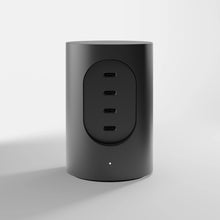
Cylindric UX1 shows how a split works. It has four USB-C ports and 165 W in total.
| Ports in use | Power from each |
|---|---|
| Any one port | Up to 100 W |
| Port 1 or 2, with port 3 or 4 | 100 W and 60 W |
| Ports 1 and 2 | 45 W and 45 W |
| Ports 3 and 4 | 30 W and 30 W |
| Ports 1, 2, and 3 or 4 | 45 W, 45 W and 30 W |
| Ports 2, 3 and 4 | 45 W, 30 W and 30 W |
| All four | 45 W, 45 W, 30 W and 30 W |
So a laptop on port 1 and a phone on port 3 can draw up to 100 W and 60 W. With all four in use, each port takes its share.

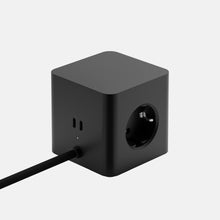
Cubical C1 is a power strip with three sockets and two USB-C ports: 65 W from one port, or 45 W and 20 W with both in use.

Power Delivery: the common language
USB Power Delivery is how a USB-C charger and a device agree on power. The device asks. The charger offers what it can. Nothing rises above 5 V until both agree, which is why a large charger is safe on a small device. More in What is USB-C Power Delivery?
In the EU it is also the rule. A device covered by the common charger rules that charges by wire above 5 V, 3 A or 15 W must support USB Power Delivery. One charger that speaks it works with all of them.
The cable sets the ceiling
The charger and the device can agree on 100 W, and the cable can still hold them to 60 W.
USB-C Cord A1 carries 100 W. Enough for the 100 W port on Cylindric UX1.

Smaller for the same power
Many chargers now use gallium nitride, GaN, in place of silicon. It loses less energy as heat, so the parts can be smaller for the same watts. Cylindric UX1 is a GaN charger. More in What is a GaN charger?


Protection and marks
A charger stays on mains power all day. Look for protection that cuts the power before damage is done.

Over-voltage
Cuts out if the voltage climbs too high

Over-current
Cuts out if too much current is drawn

Over-temperature
Cuts out if it runs too hot

Short circuit
Cuts out if the contacts are bridged
Cylindric UX1 and Cubical C1 have all four. Both are certified CE, TÜV, RoHS and REACH.
Five things to check
- The watts your device needs, from its label or its original charger.
- What each port gives, alone and shared.
- USB Power Delivery, on the charger and the device.
- A cable rated for the watts: 60 W, 100 W or 240 W.
- Protection against over-voltage, over-current, heat and short circuits.
Questions
Can a bigger charger damage my phone?
No. With USB Power Delivery the phone asks for what it needs, and the charger supplies only that. A 100 W charger gives a phone what a phone asks for.
Can I charge my phone with my laptop charger?
Yes, if both use USB-C and USB Power Delivery. The phone takes what it needs.
How many watts do I need?
The figures on the device's charging label, or the watts on its original charger. Below them, the device still charges, more slowly.
Why does my laptop say it is charging slowly?
The charger, the cable or a shared port gives less than the laptop asks for. Try a port on its own and a cable rated for the watts.
Does a USB-C charger work with an iPhone that has Lightning?
Yes, with a USB-C to Lightning cable.
What does GaN mean on a charger?
Gallium nitride, the material used for the parts that switch the power. It makes a charger smaller for the same watts. See What is a GaN charger?