Which charger does a MacBook need? And an iPhone?
Every MacBook sold today, and every iPhone from iPhone 15, charges over USB-C with USB Power Delivery, so one charger serves both. Apple's MacBook adapters run from 20 W to 140 W; an iPhone fast charges from 18 W to 60 W.

20 Wfast charges iPhone 17e and iPhone Air
40 Wfast charges iPhone 17, half full in about 20 minutes
70 Wfast charges a 15-inch MacBook Air
140 Wthe 16-inch MacBook Pro's adapter
One charger, two devices
Every MacBook Apple sells today charges over USB-C, and so does every iPhone from iPhone 15. Both use USB Power Delivery: the device asks for the power it needs, and the charger gives what it can. So one USB-C charger charges both, one after the other or at the same time.
Apple says a Mac that charges over USB-C works with any USB-C charger that supports Power Delivery, even one with more or fewer watts than the adapter Apple recommends. More watts are safe. Fewer watts charge more slowly.
iPhone 14 and earlier use Lightning. They charge from the same USB-C charger with a USB-C to Lightning cable. More in What is USB-C Power Delivery?
What each MacBook needs
Apple lists the adapters for each model. To fast charge, half full in around 30 minutes, a MacBook needs a larger one:
| MacBook | Apple's adapters | To fast charge |
|---|---|---|
| MacBook Neo | 20 W | Not listed |
| MacBook Air, 2022 or later | 30 W, 35 W dual-port, 67 W or 70 W | 67 W or more on the 13-inch, 70 W or more on the 15-inch |
| MacBook Pro 14-inch, 2021 or later | 67 W, 70 W or 96 W | 96 W or more |
| MacBook Pro 16-inch, 2021 or later | 140 W | 140 W |
Not sure which adapter came with yours? The watts are printed on it.
What each iPhone needs
An iPhone takes far less than a MacBook. Apple gives the watts for fast charging:
Apple quotes the 15 minutes for iPhone 18 Pro with a charger that gives 60 W and supports Adjustable Voltage Supply, part of USB Power Delivery 3.2. Any other USB-C charger with Power Delivery still charges it.
A larger charger is safe for an iPhone. It asks for what it needs and takes no more. More in What is fast charging?
Both from one charger
Add the two together. A 15-inch MacBook Air at 70 W and an iPhone 17 at 40 W need 110 W to fast charge at the same time. On a charger with several ports, check what each port gives with two in use, not the total on the box.

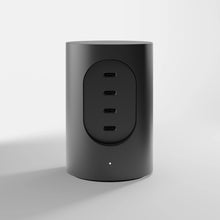
Cylindric UX1 has four USB-C ports in two pairs, 165 W in all. A MacBook on port 1 or 2 and an iPhone on port 3 or 4 can draw up to 100 W and 60 W. That is more than the 96 W adapter Apple lists for fast charging a 14-inch MacBook Pro, and more than the 40 W an iPhone 17 needs.
Put both on ports 1 and 2 instead and each gets 45 W. The MacBook still charges, more slowly. More in How to choose a USB-C charger

The cable
Above 60 W, the cable matters. Every USB-C cable carries 60 W. Above that, it needs 5 A and a small e-marker chip, and is rated 100 W or 240 W. Apple's charger for the fastest iPhones gives 60 W at most, which any USB-C cable carries.
USB-C Cord A1 carries 100 W with USB Power Delivery: enough for a MacBook Air, a 14-inch MacBook Pro and any iPhone. For the full 140 W to a 16-inch MacBook Pro, use a cable rated 240 W, or the USB-C to MagSafe 3 cable that came with the Mac.


Questions
Can I charge my iPhone with my MacBook charger?
Yes. Both use USB Power Delivery, so the iPhone asks for what it needs and the charger gives no more. For an iPhone 18 Pro's 15 minutes, though, Apple names its 40 W Dynamic Power Adapter with 60 W Max, or a 60 W charger with Adjustable Voltage Supply, not its MacBook adapters.
Can I charge my MacBook with an iPhone charger?
Yes, slowly. Apple says a Mac charges from a USB-C charger with fewer watts than its own adapter. A 20 W charger may not keep up while you work.
Is a more powerful charger safe for my MacBook?
Yes. Apple says you can use a USB-C charger with more watts than your Mac's adapter. The Mac takes what it needs.
How many watts does a MacBook Air need?
Apple's adapters for MacBook Air from 2022 run from 30 W to 70 W. To fast charge, use 67 W or more on the 13-inch and 70 W or more on the 15-inch.
How many watts does a MacBook Pro need?
The 14-inch, from 2021, comes with 67 W, 70 W or 96 W, and fast charges with 96 W or more. The 16-inch comes with 140 W and fast charges with 140 W.
Will Cylindric UX1 charge a MacBook and an iPhone at once?
Yes. Put the MacBook on port 1 or 2 and the iPhone on port 3 or 4: up to 100 W and 60 W.
Sources
The figures are Apple's, from three Apple Support pages, read in October 2026: Use a power adapter with your Mac; Fast charge your MacBook Air or MacBook Pro; Fast charge your iPhone. The Cylindric UX1 figures are from its specification.
Apple, iPhone, MacBook, MacBook Air, MacBook Pro and MagSafe are trademarks of Apple Inc.